

In October 2025, Microsoft introduced the preview of Server logic in Power Pages, which allowed the execution of business logic securely on the server to build more connected web experiences. Yesterday, April 1, 2026, this feature was announced to be GA.
With server logic, web site makers can now:
- Connect to external services such as CRM, ERP or other external systems
- Execute business workflows without exposing unwanted information in client side code
- Validate input and manipulate data on the server side
- Trigger action based on user interactions
- Keep sensitive actions secure and compliant
How does this work? Server logic executes securely within the Power Pages domain where makers can create logic using JavaScript code that executes on the server whenever a particular page needs to perform actions beyond what is available on the client side.
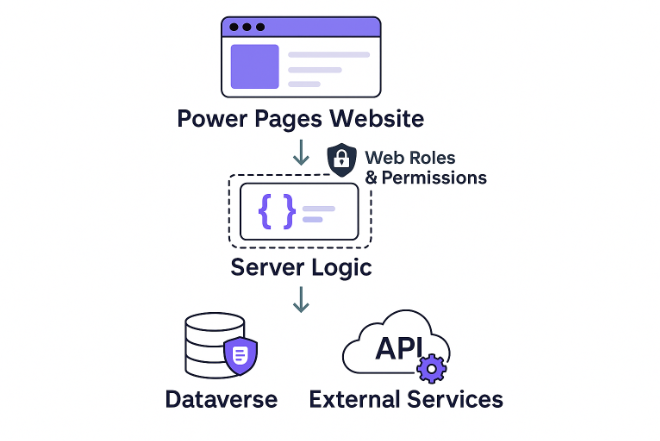
You can read the Server logic documentation on the Microsoft Learn website or see the following How to articles available.
- Interact with Dataverse tables using Server logic
- Interact with External Services using Server logic
- Interact with Microsoft Graph using Server logic
- Interact with Azure Function HTTP Trigger using Server logic
From your web page, you will be able to call the server logics using the ajaxCall function and passing parameters as needed to retrieve results as shown in the example code below. For full sample see the How to links above.
            ajaxCall('Calling Server logic...', {
            type: 'PUT',
            url: `/_api/serverlogics/services.odata.org`,
            contentType: 'application/json',
            data: JSON.stringify(Object.assign({ UserName: username, serviceSession: `${serviceSession}` }, updates)),
            success: () => { Object.assign(data.find(x => x.UserName === username), updates); render(); }
            });