

Have you ever written a Azure DevOps pipeline for the Power Platform and everything works as expected until you reach the Command Line Script to push your changes to your Azure DevOps Repo? If you have and still experiencing problems with it, you are in the right place.
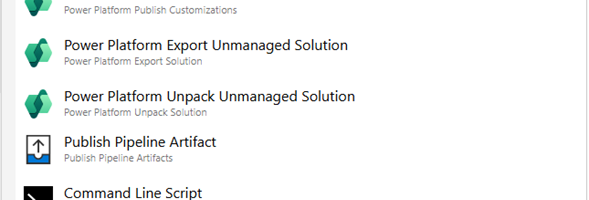
Whether you are using the Classic Design or YAML code to build you pipeline, you might have something that looks like this

You are connected to your organization, and everything is working as expected until you reach the Command Line Script and the process fails. Your code might look something like this:
echo Commit All Changes
git config user.email "agent@pipelines.onmicrosoft.com"
git config user.name "Agent Pipeline Build"
git add -A
git commit -m "Pipeline Build Solution"

echo Push Code to new Repo using one of the two lines below
git push origin "HEAD:main" -f
OR
git -c http.extraheader="AUTHORIZATION: Bearer $(System.AccessToken)" push origin HEAD:main -f
Once the code above runs in the Command Line Script, you might see errors similar to this
atal: Cannot prompt because user interactivity has been disabled.
fatal: Cannot prompt because user interactivity has been disabled.
fatal: could not read Password for 'https://FRD300@dev.azure.com/ORG/Project/_git/REPO': terminal prompts disabled
The errors that you are getting means that git tried to prompt for credentials, but since the pipeline is non-interactive, no credentials were supplied. In general there are two ways to give non-interactive credentials in git, which are using the System.AccessToken or the PAT (Personal Access Token).
The simplest way to resolve this issue is to use the System.AccessToken, but in order to do this there are a couple of configuration and security options that need to be set. The first is that we need to make sure that the Pipeline Identity (Project/Build Service) or the service account that is being used to run the pipeline has the Contribute permission on the repo. You can get there by going to Project Settings -> Repositories -> Select your Repo -> Security and then grant the Contribute permission to the Project Build Service if it does not have it.

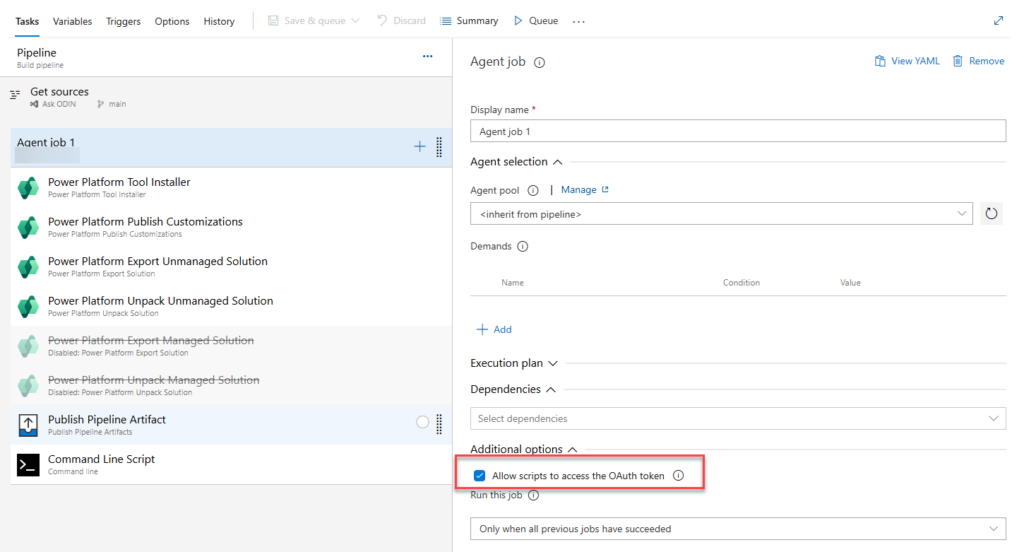
The second thing that needs to be done is in your pipeline enable the Allow Scripts to access the OAuth token option within your pipeline (in the Agent Job).
System.AccessToken is the more secure way to handle this issue, so in your Command Line Script code, make sure that you are using the following command after your Commit.
git -c http.extraheader="AUTHORIZATION: Bearer $(System.AccessToken)" push origin HEAD:main -fHope this helps some of you resolve deployment issues and adding your solutions to source control with Power Platform Pipelines in Azure DevOps.